


MCP Costs
Data Agent MCPs: A Client-side Evaluation
Published: October 27, 2026
Share this post


TL;DR: We evaluated five data-agent MCP servers from the client side on 70 real banking questions. We scored each answer for accuracy and measured token usage, tool calls, cost, and latency. Tursio was the most accurate and the fastest, and spending more per query did not buy better answers.
The Model Context Protocol (MCP) has become the standard way to connect these agents to real systems. It gives an agent a common way to discover the tools a server offers, such as a database, a search index, or a file system, and to call them. Companies no longer have to write a one-off integration for every AI product they want to support. In a short time, MCP has become how most agents talk to data.
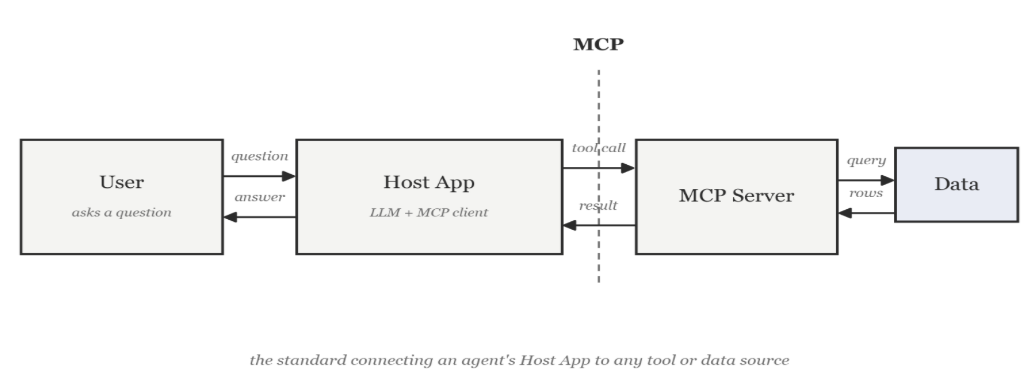
A "data agent" applies this pattern to databases and data warehouses. It takes a plain-language question, works out what data it needs, and returns an answer without anyone writing SQL by hand. Tursio builds one as an MCP server that sits in front of a company's database. The data platforms are building the same thing into their own products: Snowflake ships Cortex Analyst, and Databricks ships Genie.

We picked Snowflake and Databricks because so many companies already run them. Gartner named both Leaders in its 2025 Magic Quadrant for Cloud Database Management Systems, and industry surveys put their combined share of the data warehouse and lakehouse market at roughly a quarter to a third, more than any other independent data platform.
We used GPT-5.4 as the client agent. It costs $2.50 per million input tokens and $15.00 per million output tokens. A query that sends 5,000 input tokens and gets back 500 costs about $0.0125 for input and $0.0075 for output, or $0.02 in total. That looks negligible until you multiply it by the millions of queries a production system runs each month. At that scale, the architecture choices in this post (how many tool calls an agent makes, how much schema context it re-reads each time) stop being engineering details. They become budget line items that someone has to manage.

We evaluated agentic SQL MCP servers, which take a plain-language question from a client agent, generate SQL, run it, and return an answer. A previous intern had built the first version of the evaluation pipeline. We spent our first weeks learning how it retrieved, logged, and structured agent responses.
From there, the project had a clear shape. We picked real banking questions from actual users and tagged each one by complexity, category, intent, and other features, so the final set covered a broad range instead of leaning toward easy or narrow cases. We ran the set against five MCP servers in two phases, three times per question on each server. For every run, we logged cost, latency, tool calls, and token usage as the client saw them. Separately, we scored whether the answer was correct.
We also looked past right or wrong. We read the SQL behind each answer, tool call by tool call, to see where each platform succeeded and where it broke down. The rest of this post walks through what we found.
Correctness mattered because of an earlier Tursio study. It found that an MCP server's architecture, more than the language model behind it, usually drives cost. A pushdown design cost the client agent 50–75% less than a default, agent-driven server. But savings mean little if the answers are wrong, so this evaluation measures correctness too.
So we brushed up on SQL before writing any questions. We went through the schema column by column: which table held which product, how the tables joined at the account level, and which fields meant what their names suggested. Some didn't. DQ_91_TO_120_DAYS and DQ_121_AND_UP_DAYS are delinquency buckets, while ACTIVITY_DATE decides whether an account counts as dormant. None of this is enforced; it lives only in the column descriptions. That made it easy to get wrong, and every system we tested got some part of it wrong at least once, as the rest of this post shows.
We spent the first week connecting Snowflake and Tursio, learning the pipeline we inherited, and studying the schema, so we could start the evaluation in week two. Databricks came later and needed its own setup for the same reasons. Here is how each system we tested works.

Sample question classification sheet

We graded every system, in both phases, on the same 70 questions, so you can compare the numbers directly.
Raw run trace (Tursio, Q1, Run 1)
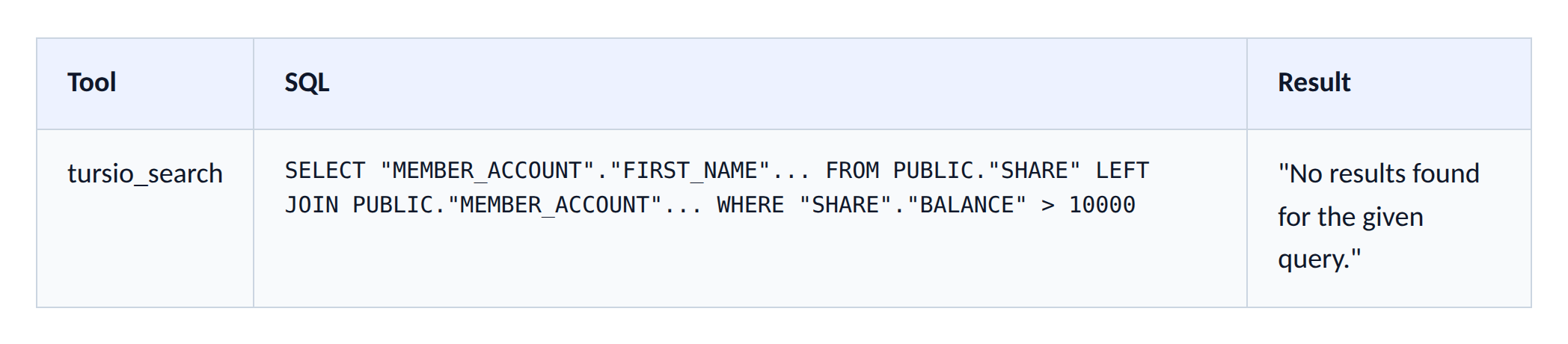
A raw trace can't tell you which system is better, so we turned the traces into numbers: cost, latency, tool calls, and tokens, averaged over the three runs of each question. We wrote a pandas script to do it. It reads every JSON trace for a question, pulls out the metrics, averages them across the three runs, and writes one row into the spreadsheet. Doing this by hand for 70 questions across five systems would have meant thousands of manual entries, repeated every time we reran a phase.
JSON traces (70 × 3 runs × 5 systems) → pandas script → Spreadsheet (1 averaged row per question)
The spreadsheet also contains the full details that we needed for grading, including the SQL for each tool call, the natural-language query Tursio generated internally, and the command and output of every tool call, for every question we ran. This made it easy to trace any average back to the SQL behind it. That is how we found most of the failures that we describe later in this post.
First, we read the SQL for every run, not just the final answer. We checked which table each query filtered on, whether a join could double-count rows, and whether the final answer matched what the SQL returned. A system can write correct SQL and still misreport the result. It can also write wrong SQL and land on a plausible number by accident. We wanted to know which one happened.
Second, an LLM grader checked each run. We gave it the question, the generated SQL, and the actual result, and asked whether the final answer matched. Third, Zubin and I each regraded every run by hand in separate sheets, then compared notes. When we disagreed, we went back to the raw SQL and its result and settled it together.
The LLM grader was not always reliable. On one Databricks SQL run about account balances, it marked the answer correct while its own reasoning said the answer was wrong. The system used only share balance, though the data showed matching accounts had loan balances too. We caught this only because we read the reasoning ourselves instead of trusting the 0/1 score next to it.
Example grading sheet (Databricks SQL, Q3)

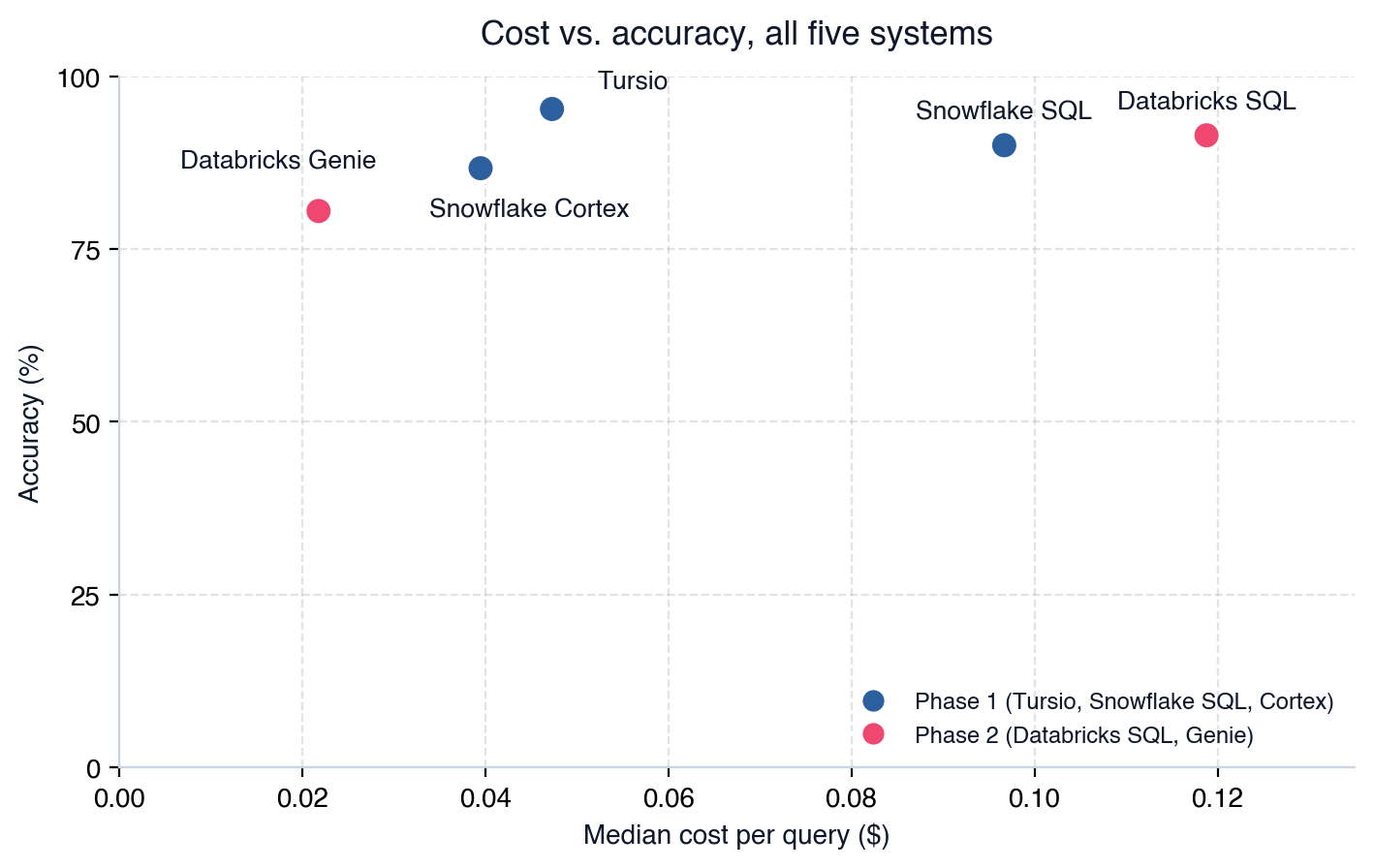

Tursio was the fastest in terms of latency and the most accurate. Databricks SQL came close on accuracy but cost nearly three times as much and took three times as long. Genie was the cheapest system and the least accurate. Interestingly, more tool calls did not mean better answers. Databricks SQL averaged 13.67 tool calls, and Snowflake SQL 8.17, yet Tursio beat both on accuracy with just 2 tool calls on average.
Q1 (Low) — List members with account balance > $10,000
Tursio and Snowflake SQL both filtered on SHARE.BALANCE and returned zero rows. No member in this dataset has more than $10,000 in share balance, so zero rows is correct.
Cortex filtered on curr_net_mo_pay instead, a monthly income field whose name was close enough to "balance" to fool its semantic layer. It returned 747 rows and presented them as fact, with no warning. This run was also the most expensive on this question ($0.23) and the slowest (89 seconds). Cortex was wrong, and paid the most to be wrong. Genie, which we tested in Phase 2, failed this question differently. Its runs disagreed with each other, and none matched the zero rows that Tursio, Snowflake SQL, and Databricks SQL all reached on their own.
Q17 (Medium) — Shares that may trigger a withdrawal-limit warning
The schema has no field or threshold that defines "may trigger a warning." Each system had to decide what it means.
Tursio chose an 80%-of-limit threshold and applied it in all three runs. That matched the definition we used for grading. Snowflake SQL used the most tool calls (9.3 on average) and cost the most ($0.11), yet scored worst (1 of 3 runs correct). It applied no threshold and simply returned the 25 shares nearest their limit. A top-25 list is not the same as flagging every share near its limit. The extra tool calls bought more querying, not a better reading of "warning."
Q6 (High) — % of dormant accounts with additional inactive products
This question requires combining loan, share, and card activity for each account. Each product lives in its own table, and an account can have more than one of each, so a naive join multiplies rows and inflates the count.
Snowflake SQL first reduced each product table to one row per account, then joined the three summaries. The order matters. Aggregating first counts each account once, however many loans or shares it holds. Joining first can count the same account several times. Snowflake SQL scored 3 of 3. Cortex joined loan and card data directly without checking that the account owned the product. The join multiplied rows for accounts with more than one product. Its result, 97% of dormant accounts flagged with an inactive product, should have raised a red flag on its own. That number is far too high for real data. Tursio also scored 3 of 3, but it needed 13.3 tool calls and $0.24. Its self-correction loop retried several times before it found the right join order.
Pros
Cons
Pros
Cons
Pros
Cons
Pros
Cons
Pros
Cons
The gap has the same cause the grading kept exposing. Cortex and Genie are agentic: they choose their tool calls mid-conversation. A model built on features known before the query runs cannot predict a decision the system has not yet made.
So the estimator now first checks whether our graded dataset has an observed result for that exact question. If it does, it shows that number instead of a prediction. If not, it falls back to the regression model.
The most useful result was a clear picture of where Tursio's agent is strong, where it breaks, and which failures (the schema mismatch and the retries on hard multi-table questions) to fix next. As interns starting our careers, we found the project eye-opening, and we learned a great deal from it and from the people at Tursio.
Thanks to the whole Tursio team. Zubin and I had a wonderful time, and we will carry what we learned forward.
Background
We are Rithvik Rathinasabapathy, a second-year Electrical and Computer Engineering student at the University of Washington, Seattle, and Zubin Sannakkayala, a fourth-year Data Science major at UC San Diego. We interned at Tursio together from June to September 2026. We came in with some database background. We built data pipelines in BigQuery, wrote SQL to clean and aggregate data for dashboards, built full-stack apps on MongoDB, and took database courses at our universities. We had also built LLM apps that used vector search to pull product data and recommend items to customers. That work taught us how tokens and token costs work, which turned out to be central to this project. We were eager to learn and contribute, so we dove straight in.What MCP is and why it matters
An AI agent does more than answer a question. It takes actions and calls tools to find the answer. Agents are everywhere now. In the last two years, most serious AI products have moved from a single prompt and response to agents that look things up, run code, or query a database before they answer.The Model Context Protocol (MCP) has become the standard way to connect these agents to real systems. It gives an agent a common way to discover the tools a server offers, such as a database, a search index, or a file system, and to call them. Companies no longer have to write a one-off integration for every AI product they want to support. In a short time, MCP has become how most agents talk to data.
A "data agent" applies this pattern to databases and data warehouses. It takes a plain-language question, works out what data it needs, and returns an answer without anyone writing SQL by hand. Tursio builds one as an MCP server that sits in front of a company's database. The data platforms are building the same thing into their own products: Snowflake ships Cortex Analyst, and Databricks ships Genie.
We picked Snowflake and Databricks because so many companies already run them. Gartner named both Leaders in its 2025 Magic Quadrant for Cloud Database Management Systems, and industry surveys put their combined share of the data warehouse and lakehouse market at roughly a quarter to a third, more than any other independent data platform.
The token cost problem
Token cost is no longer a minor line item. Enterprise AI budgets grew from about $1.2 million a year in 2024 to $7.0 million in 2026. Inference, the money spent on model API calls, is now the second-largest line item after talent. Two years ago, 31% of FinOps teams actively managed AI inference spend. Today, 98% do, making it the fastest-growing category the FinOps Foundation has tracked. Companies are responding with prompt compression, output caching, and routing easy questions to cheaper models. In surveyed enterprises, these steps cut AI costs by 30–60%.We used GPT-5.4 as the client agent. It costs $2.50 per million input tokens and $15.00 per million output tokens. A query that sends 5,000 input tokens and gets back 500 costs about $0.0125 for input and $0.0075 for output, or $0.02 in total. That looks negligible until you multiply it by the millions of queries a production system runs each month. At that scale, the architecture choices in this post (how many tool calls an agent makes, how much schema context it re-reads each time) stop being engineering details. They become budget line items that someone has to manage.
Project Overview
Zubin and I joined Tursio in June 2026. We wrote this post at the end of our internship to look back on our project and what came out of it.We evaluated agentic SQL MCP servers, which take a plain-language question from a client agent, generate SQL, run it, and return an answer. A previous intern had built the first version of the evaluation pipeline. We spent our first weeks learning how it retrieved, logged, and structured agent responses.
From there, the project had a clear shape. We picked real banking questions from actual users and tagged each one by complexity, category, intent, and other features, so the final set covered a broad range instead of leaning toward easy or narrow cases. We ran the set against five MCP servers in two phases, three times per question on each server. For every run, we logged cost, latency, tool calls, and token usage as the client saw them. Separately, we scored whether the answer was correct.
We also looked past right or wrong. We read the SQL behind each answer, tool call by tool call, to see where each platform succeeded and where it broke down. The rest of this post walks through what we found.
The chronology
- Inherited the pipeline from a previous intern
- Selected real user questions, classified by feature
- Ran questions against 5 MCP servers, phase by phase
- Logged cost, latency, tokens, tool calls per run, as seen by the client
- Graded each answer and its SQL, call by call
- Insights (below)
Correctness mattered because of an earlier Tursio study. It found that an MCP server's architecture, more than the language model behind it, usually drives cost. A pushdown design cost the client agent 50–75% less than a default, agent-driven server. But savings mean little if the answers are wrong, so this evaluation measures correctness too.
Schema and systems
We ran this evaluation on a synthetic, static dataset modeled on Jack Henry's Symitar, a core banking platform that credit unions use. The main tables are MEMBER_ACCOUNT, SHARE, LOAN, and CARD, joined by account number. The data is synthetic, but the schema problems in it are realistic. Several business terms are defined nowhere, and combining loan, share, and card data for each account takes a join that is easy to get wrong.So we brushed up on SQL before writing any questions. We went through the schema column by column: which table held which product, how the tables joined at the account level, and which fields meant what their names suggested. Some didn't. DQ_91_TO_120_DAYS and DQ_121_AND_UP_DAYS are delinquency buckets, while ACTIVITY_DATE decides whether an account counts as dormant. None of this is enforced; it lives only in the column descriptions. That made it easy to get wrong, and every system we tested got some part of it wrong at least once, as the rest of this post shows.
We spent the first week connecting Snowflake and Tursio, learning the pipeline we inherited, and studying the schema, so we could start the evaluation in week two. Databricks came later and needed its own setup for the same reasons. Here is how each system we tested works.
Tursio
Tursio builds a context graph of the database ahead of time: an automatically generated map of tables, relationships, and business meaning. GPT-5.4 sends the question to Tursio as plain text, not SQL. Tursio then turns the question into a query, grounded in that context graph. A self-correction step reruns the query if an intermediate result looks wrong.Snowflake SQL
The default Snowflake MCP can run SQL directly on the warehouse. GPT-5.4 runs SHOW TABLES and DESCRIBE TABLE to learn the schema, then writes and runs the SQL itself, with no semantic layer to lean on.Snowflake Cortex
Snowflake’s Cortex Analyst answers through a semantic model, a mapping from business terms to specific tables and columns. Someone has to build that model first, so we built one (SEMANTIC_VIEW) before we could grade Cortex on any question. GPT-5.4 sends the question as a plain message. Cortex, not GPT-5.4, turns it into a SEMANTIC_VIEW query. Any gap in the semantic model shows up directly in the answers, as the Q1 and Q6 examples below show. On the plus side, Cortex tells you when a question falls outside its model. When we asked for loan counts by credit score, a field not in this schema, it said so instead of substituting a similar field, and still delivered the loan-count breakdown it could support. No other Phase 1 system did that on its own.Databricks SQL
Databricks SQL works like Snowflake SQL. GPT-5.4 gets a read-only SQL execution tool and explores catalogs, schemas, and tables on its own (SHOW CATALOGS, DESCRIBE TABLE) before it writes a query. That habit makes it accurate (91.43%, with no question fully missed) but costly: it ran more tool calls than any other system, at a $0.1188 median cost and over a minute of median latency. Exploring does not guarantee a right answer, either. On one hard question, it spent 21.7 tool calls and $0.24 and still scored 1 of 3, because it tied "dormant" to a hardcoded past date instead of today's.Databricks Genie
GPT-5.4 submits the question to a configured Genie space and polls for the response. Genie, not GPT-5.4, writes the SQL, using whatever relationships and definitions someone set up in that space. That makes Genie cheap but inconsistent: the same question can come back with a different reading on each run, as the Q1 example below shows. This inconsistency, more than any single wrong answer, is why Genie finished last at 80.48% accuracy.Query workload
We started with about 230 real questions from query logs, the kind a credit union analyst would ask. We cut these to 100 by removing near-duplicates, while keeping a mix of complexity, category, and intent so the set wouldn't lean toward easy or narrow cases. We then dropped 30 more, mostly questions too open-ended to grade consistently, which left a final set of 70. Here is how the 70 questions break down by complexity, category, and intent:Sample question classification sheet
We graded every system, in both phases, on the same 70 questions, so you can compare the numbers directly.
Collecting results
Tursio's tooling runs each query and records a trace: every tool the agent called, the SQL or arguments it sent, and the raw result that came back, in order, for all three runs. We stored that trace for every question, on every MCP server, as a JSON file. Neither of us had watched a client-side agent work tool call by tool call before. We had only ever read final answers. It was fascinating to watch an agent run SHOW TABLES, then DESCRIBE TABLE, then a wrong query, then a corrected one, and then wait to see whether it landed on the right number.Raw run trace (Tursio, Q1, Run 1)
A raw trace can't tell you which system is better, so we turned the traces into numbers: cost, latency, tool calls, and tokens, averaged over the three runs of each question. We wrote a pandas script to do it. It reads every JSON trace for a question, pulls out the metrics, averages them across the three runs, and writes one row into the spreadsheet. Doing this by hand for 70 questions across five systems would have meant thousands of manual entries, repeated every time we reran a phase.
JSON traces (70 × 3 runs × 5 systems) → pandas script → Spreadsheet (1 averaged row per question)
The spreadsheet also contains the full details that we needed for grading, including the SQL for each tool call, the natural-language query Tursio generated internally, and the command and output of every tool call, for every question we ran. This made it easy to trace any average back to the SQL behind it. That is how we found most of the failures that we describe later in this post.
Reviewing SQLs
We ran each question three times on each system, so no single lucky or unlucky run could decide the score. We graded each question from 0 to 3, one point per correct run, in three stages.First, we read the SQL for every run, not just the final answer. We checked which table each query filtered on, whether a join could double-count rows, and whether the final answer matched what the SQL returned. A system can write correct SQL and still misreport the result. It can also write wrong SQL and land on a plausible number by accident. We wanted to know which one happened.
Second, an LLM grader checked each run. We gave it the question, the generated SQL, and the actual result, and asked whether the final answer matched. Third, Zubin and I each regraded every run by hand in separate sheets, then compared notes. When we disagreed, we went back to the raw SQL and its result and settled it together.
The LLM grader was not always reliable. On one Databricks SQL run about account balances, it marked the answer correct while its own reasoning said the answer was wrong. The system used only share balance, though the data showed matching accounts had loan balances too. We caught this only because we read the reasoning ourselves instead of trusting the 0/1 score next to it.
Our grading pipeline
- Each question run 3× per system
- Every SQL statement is logged
- Check the SQL for tables, joins, double counting
- LLM grades the final answer
- Two reviewers grade independently
- Disagreements resolved against raw SQL
- Score, cost, latency, tool calls logged
Example grading sheet (Databricks SQL, Q3)
Cost and accuracy move differently
We tested Tursio, plain Snowflake SQL, and Snowflake Cortex first. Across all five systems, we observed that spending more per query did not buy more correct answers.Tursio was the fastest in terms of latency and the most accurate. Databricks SQL came close on accuracy but cost nearly three times as much and took three times as long. Genie was the cheapest system and the least accurate. Interestingly, more tool calls did not mean better answers. Databricks SQL averaged 13.67 tool calls, and Snowflake SQL 8.17, yet Tursio beat both on accuracy with just 2 tool calls on average.
Analyzing sample questions
Averages don't show what goes wrong, so let's dig into three sample questions. We ran each one on the three Phase 1 systems (and Q1 on Genie as well) and traced why each system succeeded or failed.Q1 (Low) — List members with account balance > $10,000
Tursio and Snowflake SQL both filtered on SHARE.BALANCE and returned zero rows. No member in this dataset has more than $10,000 in share balance, so zero rows is correct.
SELECT ma.first_name, ma.last_name_non_indiv_name,
       ma.account_number, ...
FROM SYNTHETIC_DATASET.PUBLIC.MEMBER_ACCOUNT ma
WHERE ma.curr_net_mo_pay > 10000
-- wrong field, monthly income not balance
-- Result: 747 rows returned, stated as fact, no caveat
Cortex filtered on curr_net_mo_pay instead, a monthly income field whose name was close enough to "balance" to fool its semantic layer. It returned 747 rows and presented them as fact, with no warning. This run was also the most expensive on this question ($0.23) and the slowest (89 seconds). Cortex was wrong, and paid the most to be wrong. Genie, which we tested in Phase 2, failed this question differently. Its runs disagreed with each other, and none matched the zero rows that Tursio, Snowflake SQL, and Databricks SQL all reached on their own.
-- Genie, three separate runs of the same question (Q1):
Run 1, combined share + loan balance > $10,000 -> 544 rows
Run 2, filter dropped entirely -> "no members found"
Run 3, combined share + loan balance again -> 544 rows

-- Databricks SQL, Tursio, and Snowflake SQL all agreed independently,
-- 0 rows (share balance only)
Q17 (Medium) — Shares that may trigger a withdrawal-limit warning
The schema has no field or threshold that defines "may trigger a warning." Each system had to decide what it means.
SELECT DISTINCT "SHARE"."ACCOUNT_NUMBER",
       "SHARE"."WITHDRAWAL_COUNT",
       "SHARE"."WITHDRAWAL_LIMIT"
FROM PUBLIC."SHARE"
WHERE "WITHDRAWAL_LIMIT" > 0
AND "WITHDRAWAL_COUNT" >= 0.8 * "WITHDRAWAL_LIMIT"
-- Tursio's own rule, flag shares at 80% or more of their limit.
-- Same rule, all 3 runs.
Tursio chose an 80%-of-limit threshold and applied it in all three runs. That matched the definition we used for grading. Snowflake SQL used the most tool calls (9.3 on average) and cost the most ($0.11), yet scored worst (1 of 3 runs correct). It applied no threshold and simply returned the 25 shares nearest their limit. A top-25 list is not the same as flagging every share near its limit. The extra tool calls bought more querying, not a better reading of "warning."
Q6 (High) — % of dormant accounts with additional inactive products
This question requires combining loan, share, and card activity for each account. Each product lives in its own table, and an account can have more than one of each, so a naive join multiplies rows and inflates the count.
-- Snowflake SQL approach, aggregate each product table down to
-- one row per account, THEN join
WITH dormant_accounts AS (...), share_status AS (...),
     loan_status AS (...), card_status AS (...)
all_products AS ( SELECT ... FROM share_status
     UNION ALL ... loan_status ...
     UNION ALL ... card_status )
-- Cortex approach, joins loan and card directly without first
-- checking the account owns the product
-- Result: 884 / 911 = 97.0%
Snowflake SQL first reduced each product table to one row per account, then joined the three summaries. The order matters. Aggregating first counts each account once, however many loans or shares it holds. Joining first can count the same account several times. Snowflake SQL scored 3 of 3. Cortex joined loan and card data directly without checking that the account owned the product. The join multiplied rows for accounts with more than one product. Its result, 97% of dormant accounts flagged with an inactive product, should have raised a red flag on its own. That number is far too high for real data. Tursio also scored 3 of 3, but it needed 13.3 tool calls and $0.24. Its self-correction loop retried several times before it found the right join order.
Pros and cons of each system
Tursio
95.24% accuracy · $0.0473 median cost · 2.00 tool callsPros
- Highest accuracy of all five systems tested.
- Cheapest and fastest on most questions.
- Its self-correction loop catches some bad intermediate results before they reach the final answer.
Cons
- Initially failed 11 of 100 questions because of a schema mismatch: with no ACCOUNT table, it invented a field to infer product ownership.
- On hard, multi-table questions, its self-correction loop can retry several times, driving up tool calls and cost.
Snowflake SQL
90.00% accuracy · $0.0967 median cost · 8.17 tool callsPros
- Second-highest accuracy of the five.
- Most reliable at combining loan, share, and card data at the account level, because it aggregates each product line before joining.
Cons
- The most expensive and slowest Phase 1 system, at about 2x Tursio's cost and 3 to 4x its tool calls.
- More tool calls did not guarantee better answers. On Q17, it cost the most and still scored worst (1 of 3).
Snowflake Cortex
86.67% accuracy · $0.0395 median cost · 2.67 tool callsPros
- Cheapest Phase 1 system.
- Says plainly when its semantic model can't answer a question instead of guessing.
Cons
- Lowest accuracy in Phase 1, and worst on low-complexity questions (80.56%). It tends to substitute a similarly named field for the one asked about.
- Not fully deterministic: the same question can yield different SQL on different runs.
- Much of this looks fixable. A semantic view with clearer relationships, joins, and definitions would likely close much of the gap.
Databricks SQL
91.43% accuracy · $0.1188 median cost · 13.67 tool callsPros
- Most accurate Phase 2 system, and the only system in either phase with zero full misses (0 of 3) across all 70 questions.
- Exploring the schema first makes it the strongest system on vaguely phrased questions (95.24% vs. 71.43% for Genie).
Cons
- The most expensive and slowest system tested in either phase.
- Exploration doesn't guarantee a right answer. One harder question cost $0.24 and 21.7 tool calls and still scored 1 of 3, because it tied "dormant" to a fixed date instead of today's.
Databricks Genie
80.48% accuracy · $0.0218 median cost · 2.17 tool callsPros
- Cheapest system in either phase, and faster than Databricks SQL.
- Handles simple, well-defined questions cheaply and correctly.
- Like Cortex, says when a field isn't in the schema instead of guessing.
Cons
- Lowest accuracy of all five systems, and the only Phase 2 system with full misses (6 of 70 scored 0/3).
- Its main weakness is inconsistency. Three runs of the same question can yield three different readings of it.
- This also looks fixable. A Genie space with explicit relationships and schema documentation would likely reduce much of the inconsistency.
Learned cost estimator
Once we had graded all five systems and trusted the data, we built cost-prediction models. We trained one regression model per platform and token type, and evaluated each with leave-one-out cross-validation, so no model was tested on a question it had seen in training. Results varied by system. Snowflake's input-token model had a usable median error of about 27%. Cortex's was about 86%, which is unusable. A confident-looking dollar figure that's wrong by that much is worse than no figure at all.The gap has the same cause the grading kept exposing. Cortex and Genie are agentic: they choose their tool calls mid-conversation. A model built on features known before the query runs cannot predict a decision the system has not yet made.
So the estimator now first checks whether our graded dataset has an observed result for that exact question. If it does, it shows that number instead of a prediction. If not, it falls back to the regression model.
What we'd take with us
When we started, neither of us had done research at this depth. We ran a real evaluation across five systems and seventy real questions. We collected data and checked answers by hand as carefully as any automated tool. The patterns appeared only once we had enough results to compare. We studied how the same question became different SQL on different servers, and how that SQL produced different answers. That detail led to the findings in this post.The most useful result was a clear picture of where Tursio's agent is strong, where it breaks, and which failures (the schema mismatch and the retries on hard multi-table questions) to fix next. As interns starting our careers, we found the project eye-opening, and we learned a great deal from it and from the people at Tursio.
Thanks to the whole Tursio team. Zubin and I had a wonderful time, and we will carry what we learned forward.
Related blog posts

Tuning LLM Calls for Predictable Outputs
Output parser is a critical choice in LLM calls and they decides whether your responses are cheap and reliable.
Shivani Tripathi
Read more

Token Costs for AI/BI
Token costs is a growing concern with the recent popularity of AI/BI. While vendors like Databricks and Snowflake have their embedded AI/BI solutions, we compare their costs with a database-agnostic approach.
Alekh Jindal
Read more

Context Tuning for Enterprise Data
Context is the most valuable commodity in enterprise AI, Tursio combines automatic inference with business artifacts and people's knowledge to make it usable.
Alekh Jindal, Wangda Zhang
Read more
Bring search to your
workflows
workflows
See how Tursio helps you work faster, smarter, and more securely.




'/%3e%3c/g%3e%3cdefs%3e%3clinearGradient%20id='paint0_linear_7851_102227'%20x1='0'%20y1='174.933'%20x2='1312'%20y2='174.933'%20gradientUnits='userSpaceOnUse'%3e%3cstop%20stop-color='%231E4EC4'/%3e%3cstop%20offset='0.8'%20stop-color='%230D6EFD'/%3e%3cstop%20offset='1'%20stop-color='%235BC0EB'/%3e%3c/linearGradient%3e%3c/defs%3e%3c/svg%3e)